
ADI credit application form: which US PDF to use, and who prepares each part
Updated
Match the current US ADI short form or long form to the limit and payment method, then assign each block before you send the packet.
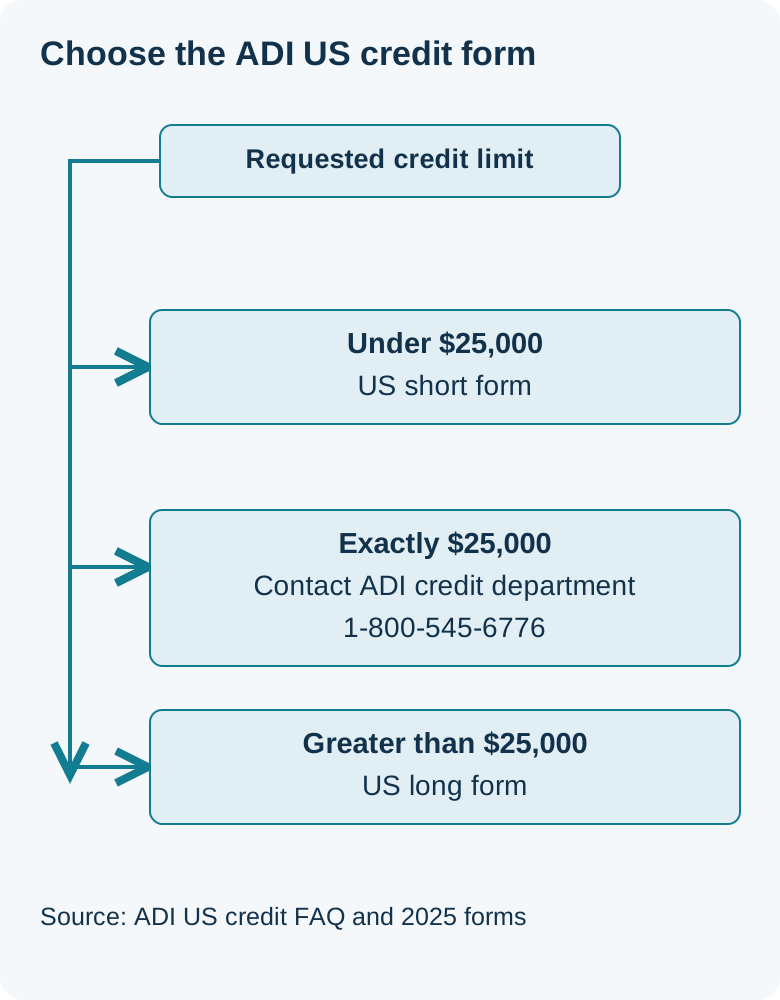
Use the US short form when the credit limit on the application is under $25,000, and the US long form when it is greater than $25,000. Those are the two PDFs linked from ADI's US credit page, with account-type instructions in each PDF. Neither that page nor the form titles says which file to use at exactly $25,000. Call the ADI credit department at 1-800-545-6776 before you choose. On the short form, COD, cash, and credit card at the point of sale say to complete Section A only. Company check and e-check say to complete all sections. The Credit Account box does not print a section list. The long form does not print those section instructions. A buyer who skips a credit line can still pay: ADI's credit FAQ says those customers pay for orders in full when they receive them.
This checklist is for a US installer who has already decided to apply to ADI for terms and wants to assemble the packet once. It is compiled from ADI's US credit FAQ and the two US PDFs that page links. DistributorIndex is a manufacturer; this guide is part of our brand and channel resource library. Use the listing’s source and relationship details for company research and submit credit applications directly to ADI.
Company approval and employee logins are a different step. Use how to get an ADI account in the US for that, then come back here for the credit packet.
Which ADI credit application form PDF do you open?
Open the US short form for a limit under $25,000, and the US long form for a limit greater than $25,000. ADI's credit FAQ says that after the customer application, you may apply for a credit limit under $25,000 or a credit limit over $25,000, based on annual sales and estimated credit spend. The short form's page 2 title is "ADI New Account Application for Low Limit (Under $25,000)". The long form's page 2 title is "ADI New Account Application for High Limit (Greater than $25,000)". The file names on the copies reviewed October 11, 2026 are US_SHORT_FORM_APPLICATION_2025.pdf and USLongForm2025.pdf.
Exactly $25,000 is the gap. The FAQ says "under" or "over". The form titles say "Under" or "Greater than". None of those lines says what to do when the requested limit is $25,000 on the nose. Do not guess a form from that silence. Call the ADI credit department at 1-800-545-6776, the number printed on page 1 of both PDFs.
Use those two 2025 files, the ones linked from the US credit page: US short form PDF and US long form PDF. A 2019 short-form file was still on ADI's CDN on October 11, 2026. This checklist uses the 2025 files only. A search for the ADI credit application form PDF also turns up other companies' templates. The packet here is the two US files linked above.

Common mistake: picking the long form because $25,000 "feels" like the high side, or the short form because it is the file that ranks. The titles are under versus greater than. The equal amount is a question for the credit department.
When this does not apply: ADI accounts outside the United States, and a request to raise a credit line you already have. The FAQ says an existing customer asks the store sales team or the credit analyst on the account, and that additional information may be necessary. That request is not this new-application packet.
Takeaway: short form under $25,000, long form above $25,000, and a phone call to the ADI credit department if the figure is exactly $25,000.
Which payment method changes the sections you complete?
On the short form, the account-type line tells you the sections. COD, Cash, and Credit Card (Point of Sale Only) each say FILL ONLY SECTION A. Company Check and e-Check each say FILL ALL SECTIONS. The Credit Account box sits between those labels and does not print a section list of its own. Page 1 still says to include at least three trade references, with phone, fax, and your customer account number, for applications for credit terms, and that your signature must be witnessed for a credit account. If you tick Credit Account, ask the credit department which of Sections B through F that box adds. Do not treat the neighboring "all sections" label as if it belonged to Credit Account.
The long form is a different instruction. Page 2 offers Company Check, Credit Card (Point of Sale Only), and e-Check, and it does not print "Section A only" or "all sections" on any of them. It also does not print COD, Cash, or Credit Account. Do not copy the short form's section labels onto the long form. If you need a section list for one of those three boxes, ask the ADI credit department.
The short form runs through printed page 4. The long form runs through printed page 6. Page 1 on each is the documentation cover: product lines, the include list, the credit-department phone, and the instruction to email the finished credit application to ADICREDITAPPS@ADIGLOBAL.COM.
Scroll horizontally to see all table columns on smaller screens.
| Account type | What the form prints | Who the form names | Responsible person |
|---|---|---|---|
| Short form: COD | Page 2: FILL ONLY SECTION A | Company officer completes Section A | ________ |
| Short form: Cash | Page 2: FILL ONLY SECTION A | Company officer completes Section A | ________ |
| Short form: Credit Card (Point of Sale Only) | Page 2: FILL ONLY SECTION A | Company officer completes Section A | ________ |
| Short form: Company Check | Page 2: FILL ALL SECTIONS | Split the sections across the matrix below | ________ |
| Short form: Credit Account | Page 2 prints no section list beside this box. Page 1 requires trade references for credit terms and a witnessed signature for a credit account | Ask the ADI credit department which further sections this box requires | ________ |
| Short form: e-Check | Page 2: FILL ALL SECTIONS | Split the sections across the matrix below | ________ |
| Long form: Company Check | Page 2 prints the box and no section instruction | Do not copy the short form's section labels. Ask the credit department if you need a section list | ________ |
| Long form: Credit Card (Point of Sale Only) | Page 2 prints the box and no section instruction | Do not copy the short form's section labels. Ask the credit department if you need a section list | ________ |
| Long form: e-Check | Page 2 prints the box and no section instruction | Do not copy the short form's section labels. Ask the credit department if you need a section list | ________ |
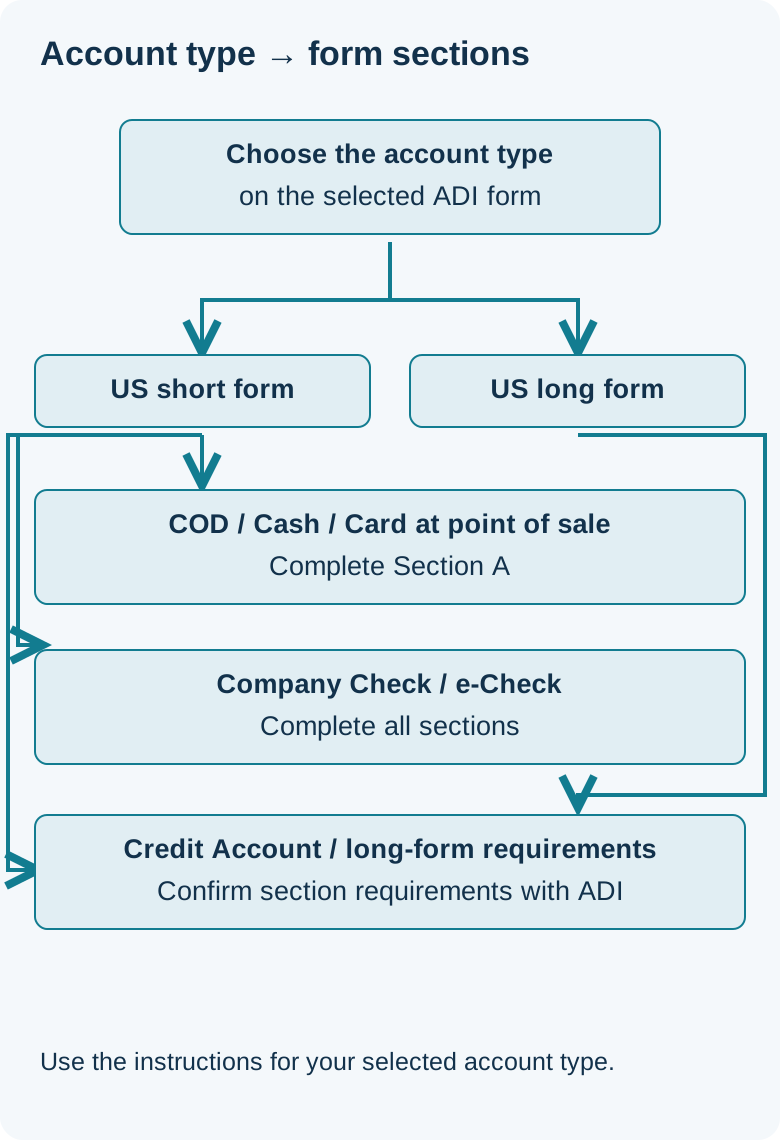
Common mistake: filling Sections B through E because they are on the short-form PDF, even after you ticked COD, Cash, or Credit Card (Point of Sale Only). Those three boxes say Section A only.
Takeaway: follow the section instructions for the selected account type; ask ADI’s credit department for the Credit Account and long-form requirements.
Who prepares the company, accounts payable, and trade-reference blocks?
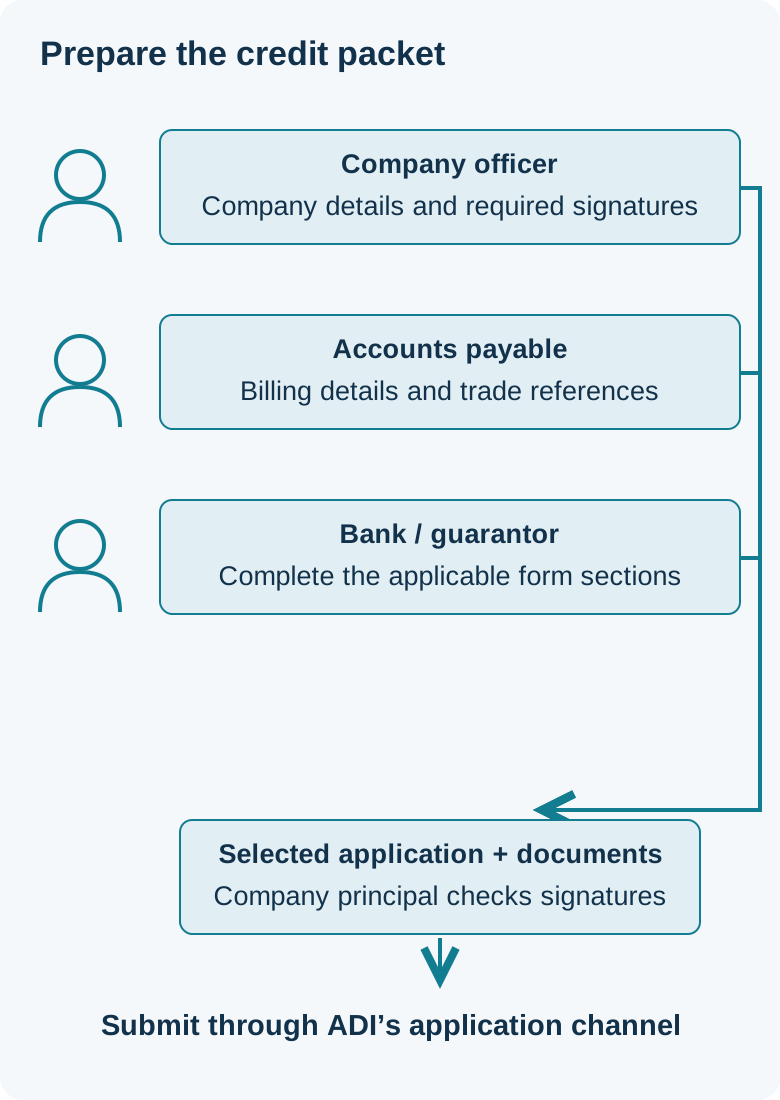
Hand the packet out by the job the form names, then write the person's name in the blank column on your own copy. Most lines inside Section A are not marked required or optional. The explicit instructions are the ones already in the payment table, plus page 1: the principal signs all necessary sections, a credit-account signature is witnessed, and trade references apply to credit terms. Where a line below has no required mark, copy what the form asks and ask the credit department if your case does not fit a box.
Section A, page 2 of both forms, is the company block: company name, Dun & Bradstreet number, address, city, state, ZIP, telephone, fax, email, shipping address or "same as above", date established as DD/MM/YYYY, business type (Sole Proprietor, Partnership, LLC, or Corporation), sales tax number, exempt no or yes plus the number, whether the sales tax certificate is provided, credit limit requested, my ADI e-commerce signup no or yes, e-invoicing no or yes, then printed name, title, date, and signature. The date line is printed DD/MM/YYYY. Page 1 lists a copy of the tax-exempt certificate in the include list. Section A says if you are exempt, provide a copy. It also has a No box. It does not say to attach a certificate when you are not exempt. If you are not sure which of those applies, ask the credit department.
The e-invoicing note under Section A says that checking yes means you will not receive paper invoices or statements by mail, and the same note includes a waiver sentence. Read that sentence on the PDF before the box is checked. The my ADI signup box is only a yes or no on this form. Employee web registration is not repeated here.
Section B on page 3 splits in two. The buyer lines are Buyer Name, Title, Address, Telephone, Fax, Cell Number, and Email. The accounts payable lines are Accounts Payable Contact, Email, Address, Telephone, Fax, and Cell Number. Section C1, still on page 3, is company banking: bank name, business account number, name on the bank account if different, loan account number, address, city, state, ZIP, bank officer or contact name, title, telephone, and years with the bank. The form does not name which job title completes C1. The long form adds Section C2, guarantor banking, with the same labels. The short form has no C2.
Section D on page 3 is three trade references. Each block asks for vendor name, title, account number, contact name, telephone, fax, and email. Page 1 says at least three, with phone, fax, and your customer account number, and that this applies to applications for credit terms only. The section heading says not to list credit card accounts, cell phones, car loans, or utilities. Leave this section out of a short-form packet that is limited to Section A.
Scroll horizontally to see all table columns on smaller screens.
| What to prepare | Printed on | Who the form names | Responsible person |
|---|---|---|---|
| Limit under $25,000 | Credit FAQ: under $25,000. Short form page 2 title. File US_SHORT_FORM_APPLICATION_2025.pdf | Company officer | ________ |
| Limit greater than $25,000 | Credit FAQ: over $25,000. Long form page 2 title. File USLongForm2025.pdf | Company officer | ________ |
| Limit exactly $25,000 | Not stated on the FAQ or either form title | ADI credit department, 1-800-545-6776 | ________ |
| Product lines | Both PDFs, page 1: Intrusion, Fire, CCTV, Access Control, Audio/Video, Tools & Hardware, Home Solutions, Wire & Cable, IP Solutions, Other | Company officer | ________ |
| Tax-exempt certificate | Both PDFs, page 1 include list, and the exempt yes/no boxes in Section A on page 2 | Company officer | ________ |
| Customer history | Both forms, page 2, before Section A: whether you are or have been an ADI customer, and the account number if yes | Company officer | ________ |
| Section A company block and signature | Both forms, page 2. Includes credit limit requested, my ADI signup, e-invoicing, and the signature under the certification paragraph | Principal of the company | ________ |
| Section B buyer contact | Both forms, page 3 | Person named as Buyer | ________ |
| Section B accounts payable | Both forms, page 3: contact, email, address, telephone, fax, cell | Accounts payable | ________ |
| Section C1 company banking | Both forms, page 3 | The form does not name a job title | ________ |
| Section C2 guarantor banking | Long form page 3 only. The short form has no Section C2 | Guarantor | ________ |
| Section D trade references | Both forms, page 3. Page 1 limits them to credit-terms applications: at least three, with phone, fax, and your customer account number. Not credit card, cell phone, car loan, or utility accounts | Trade references. Someone at your company collects them | ________ |
| No credit line | Credit FAQ, not a long-form account-type box | Pay for orders in full when you receive them | ________ |
| Where to send the finished credit application | Both PDFs, page 1 | Person sending the packet, to ADICREDITAPPS@ADIGLOBAL.COM | ________ |
Enter bank numbers, the sales tax number, and any SSN line only on ADI's own form. This page has no fields for them, and DistributorIndex does not store them.
Takeaway: the officer owns the company block, accounts payable owns the AP lines in Section B, and the three vendors own the trade references.
Where are the signature and guarantee clauses?
Complete signatures on the official application. Page 1 of both PDFs says the principal of the company signs all necessary sections, and that the signature must be witnessed for a credit account. Section A on page 2 ends with a certification paragraph and lines for printed name, title, date, and signature. Read the certification paragraph on the selected PDF before signing.
The short form prints the agreement in Section E on page 4, then lines for printed name, title, signature, date, Notarize, and SSN, then a notice to the applicant in Section F. The long form prints the agreement in Section E, a security-interest section (F), and a default section (G) across pages 4 and 5. Its signature, Notarize, and SSN lines are on page 5, followed by the notice in Section H. The guarantee is Section I, starting on page 5 and signed on page 6, with the guarantor's name, title, address, city, state, ZIP, telephone, email, signature, date, Notarize, and SSN. The short form has no Section I. Review the agreement and guarantee sections that apply to the selected form before signing; obtain qualified advice on obligations you need clarified.
If an application for business credit is denied, the notice (short form Section F, page 4; long form Section H, page 5) tells you how to ask for a written statement of reasons. It says to contact ADI at 263 Old Country Road, Melville, New York 11747, or call 800.545.6776 and choose option 2 (the form prints OPT #2), in writing within 60 days of the denial notice, and that ADI will send the statement within 30 days of receiving the request. The form header is a different street address, 275 Broadhollow Road, Melville, NY 11747. Use the address the notice itself prints for that request. Read the rest of the notice on the PDF.
Takeaway: sign on the PDF, keep the guarantee text on the PDF, and use the notice's own address if you ask for a written denial statement.
What if you do not apply for credit?
You still have a payment path. ADI's credit FAQ says customers may choose not to apply for a credit line, and that customers who do not open one must pay for orders in full when they receive the order. That is separate from ticking COD, Cash, or point-of-sale card on the short form. Those three boxes are still an application, limited to Section A. Skipping the credit application entirely is the FAQ path: pay in full on receipt.
Do not read Net 30 as automatic. The FAQ says that upon qualification, ADI's standard credit terms for most new customers are Net 30, and that you may receive specific terms based on the credit evaluation. It does not say every approved customer receives Net 30. The same FAQ says ADI extends credit based on an Equifax report and references, and that other company information, such as audited financials, may be required for larger credit lines. It does not define the dollar point where those financials begin, and nothing here predicts an approval.
Page 1 of both PDFs states a goal of having applications processed within three business days, and says that missing documentation or information means ADI will not be able to proceed. That is the form's processing goal. It is not a date by which credit is approved. The FAQ says you receive an email from the credit department when the application is approved. Your credit representative's name, phone, and email, once you have an account, are described on the FAQ as appearing in the Invoices section while logged in, and at the bottom of invoices and statements.
Takeaway: paying in full on receipt is the FAQ path for a buyer who does not apply, and Net 30 is described only for most new customers after qualification.
Send the completed credit packet to ADI
Prepare this packet for ADI, or for the counterparty you are actually buying from if the order is not with ADI. Send the packet to ADI at the address on the form you used: page 1 says to email the completed credit application to ADICREDITAPPS@ADIGLOBAL.COM, and to call the ADI credit department at 1-800-545-6776 with questions. Later pages of the short form print 631.367.0513 in the header beside the phone number. The form does not say to fax the application there.
Send company, bank and personal information only through ADI’s application channel. To compare other recorded companies, start with how to find a brand distributor and the distributor directory. Before you treat a listing as current, open its stored source as described in how to verify a distributor listing. The relationship label is explained in official, source-supported, and unverified labels. For camera and low-voltage channels, the security camera distributors hub is the directory's industry list, not an ADI application.
About this directory: what a listing means and how the directory is run. Neither page accepts a credit application.
Takeaway: send the finished packet to ADI, or prepare the equivalent for the company that will actually invoice you. Retain the written response with the quotation.
Sources and review date
Compiled from ADI's public US credit pages, reviewed from copies saved October 11, 2026: Credit FAQs, US short form PDF (4 pages), and US long form PDF (6 pages). A 2019 short-form file on the same CDN, retrieved that day, was not used for any field in this checklist.
Check ADI’s current credit page and matching application PDF for the applicable terms and contact details. Company account setup remains on how to get an ADI account in the US.