
How to get an ADI account in the US: company approval vs. online access
Updated
Choose the ADI form for a new company or an employee login. In the US, a new company applies once; employees of an existing customer link their own login.

In the US, an ADI account is opened for a company, and each person then gets online access to it. If your business is not yet an ADI customer, submit the New Customer Form on ADI's US site; ADI says its customers are licensed installers and dealers only, and its FAQ says it verifies company information within 1-2 business days. If your company already buys from ADI, do not apply again: connect your own login through Online Account Registration using the company's Account Number and Ship To number. If you already have a login, use Sign In or the username and password recovery link. Use the ADI site for the country where you are applying.
ADI Global Distribution describes its US business as a wholesale distributor of security, AV and low-voltage products. DistributorIndex is a manufacturer. This channel guide explains ADI’s own account process; applications and account decisions go through ADI.
Which ADI route fits you?
Decide first whether the company or only the person is new to ADI. A new company needs a customer application; a new person at an existing customer only needs online access connected to the company account. The table maps each situation to ADI's official US page.
Scroll horizontally to see all table columns on smaller screens.
| Your situation | Official ADI US page | Have ready | What happens next |
|---|---|---|---|
| Your business is not an ADI customer yet | New Customer Form | Company contact details, Tax ID or License #, billing and shipping address, product lines, years in business, employees, locations | An ADI representative continues the application; ADI's FAQ says it verifies company information within 1-2 business days and emails login details when approved |
| Your company already buys from ADI, but you have no login | Online Account Registration on the Sign In page | Account Number, Account Ship To, your email address, first and last name, job title | You connect to the existing company account; what you can do online depends on the access the company grants |
| You already have an ADI login | Sign In | Username (your email address) and password | Use “Forgot your username or password?” under the Sign In button if you cannot get in |
| You manage the account and want to add a colleague | Account dashboard link to add users (only if you have that permission), or Website Help | The colleague's details | Colleagues without that path use Online Account Registration themselves |
| You also want a line of credit | Credit FAQs | Submit the customer application first | Credit is a separate application after the customer application; you can also pay in full when you receive orders |
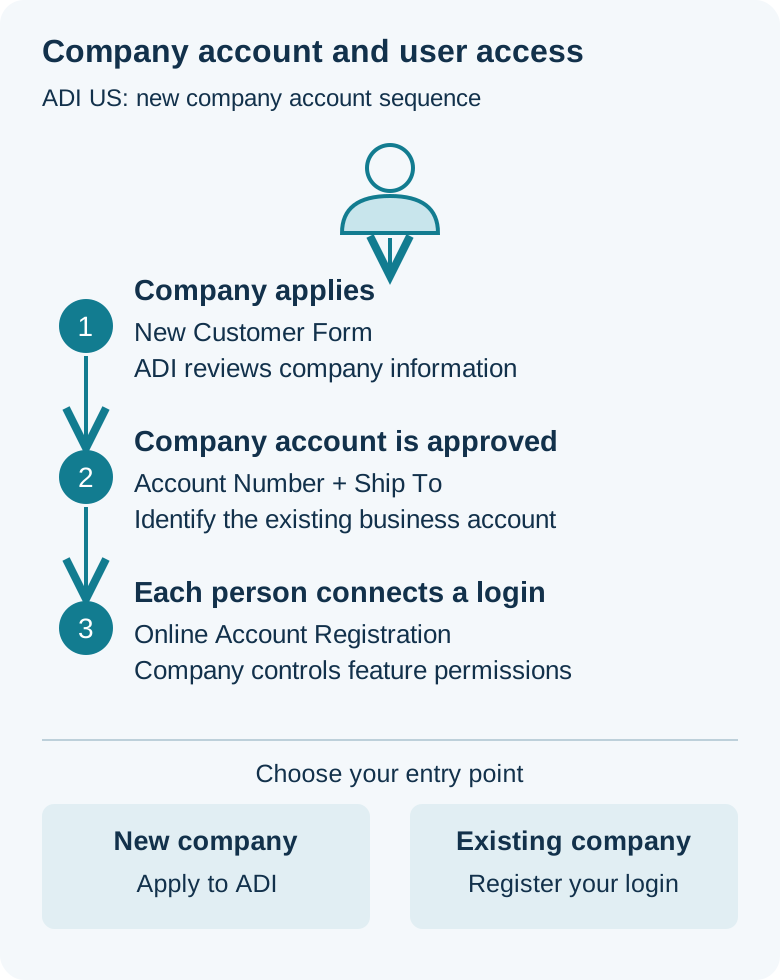
Takeaway: work out whether the company or the person is new before you open any ADI form.
Can anyone buy from ADI?
No. ADI's US FAQ states: “Our customers are licensed installers and dealers only; ADI does not sell direct to end users.” The New Customer Form repeats that ADI does not sell to end users and asks the applicant to confirm “I am a licensed installer” before submitting.
Which licence or business type ADI accepts for a particular applicant is ADI's decision, and its public pages do not list acceptable documents. If you are not sure your business fits, ask ADI before you submit; ADI confirms eligibility for the applicant’s business and market. ADI's FAQ also says no annual spend is required to become a customer.
If you are a homeowner or an end user, the usual route is to buy through an installer or dealer. To see other companies recorded in this directory, scan the distributor index or start from a product type such as security camera distributors.
Takeaway: ADI's US account is for licensed installers and dealers; end users should work through one.
What to prepare before you open the New Customer Form
The public form has four groups of fields followed by two confirmations. Fields marked with an asterisk on ADI's form are required; gather them before you start so the application is not stopped halfway.
Scroll horizontally to see all table columns on smaller screens.
| Form section | Required (*) | Shown without * |
|---|---|---|
| Contact Information | Company, First Name, Last Name, Title, Tax ID or License #, Business Phone, Email Address, Confirm Email Address | Company Website, Ext., Mobile Phone |
| Billing Address | Address Line 1, City, State, Zip Code | Address Line 2 |
| Shipping Address | Address Line 1, City, State, Zip Code (or tick “Use Billing Address as Shipping Address”) | Address Line 2 |
| Company Information | Product line(s) you are interested in; years in business; number of employees; number of locations | Comments |
| Before Submit | Confirmation that you are a licensed installer and understand ADI does not sell direct to end users; agreement to the terms and conditions | — |
The product-line list includes groups such as Access Control & Communications, Fire, Intrusion & Smart Home, Video Surveillance, Networking and Wire & Cable. The form field is labelled “Tax ID or License #”; ADI's page does not say which of the two it expects for your business or how it is evaluated, so enter what applies and ask ADI if unsure. Company size questions are form fields, not published approval thresholds.
Enter this information only on ADI's own site. Use ADI’s secure application channel for tax IDs, licences and company documents.
Common mistake: filling in this form when your employer already buys from ADI. The form is for companies that are not yet customers; ADI directs existing customers to sign in or register for an online account instead.
Takeaway: have the company, address and company-information answers ready, then submit only on ADI's US site.
Your company already buys from ADI: how employees get their own login
ADI's Website Help says employees of an existing customer should fill out the Online Account Registration form, which is on the Sign In page. It connects a person to the company's branch account and asks for Account Number, Account Ship To, Email Address, First Name, Last Name and Job Title. The email address you enter becomes your username.
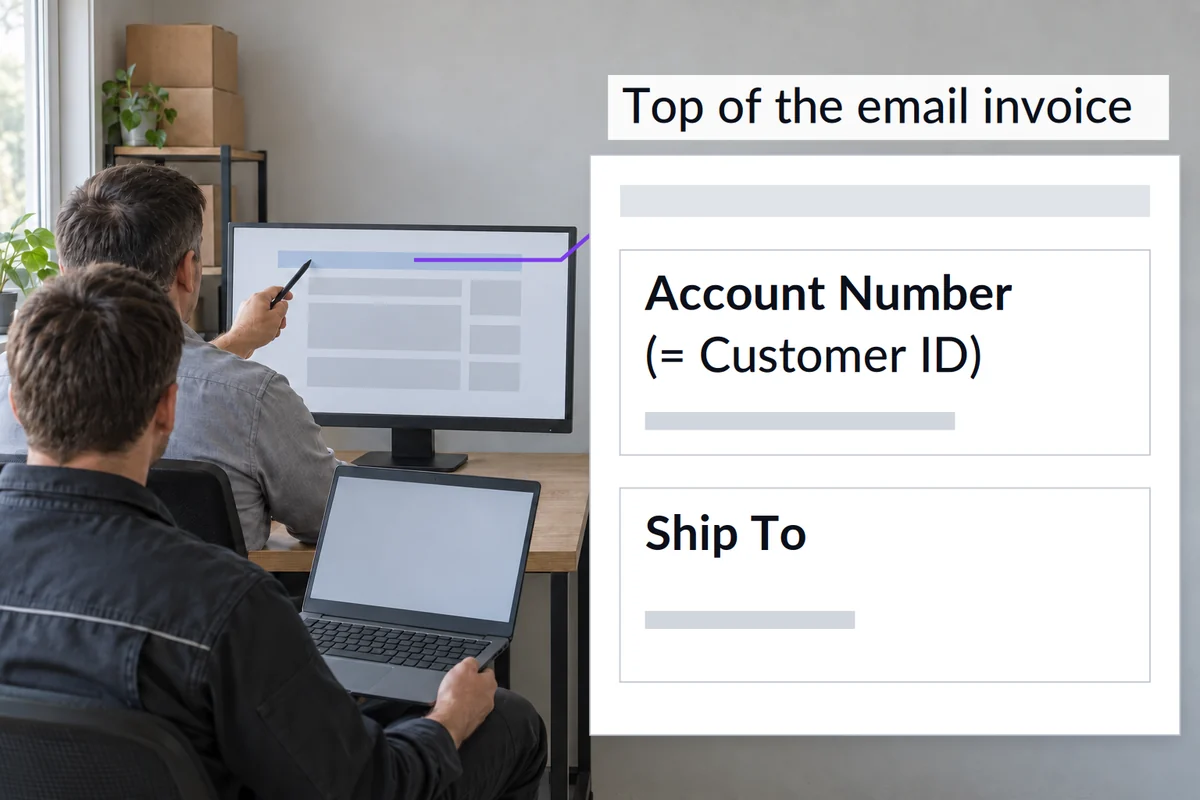
According to the registration page, the Account Number and Ship to Number appear at the top of the company's email invoice, and the Account Number is the same as the Customer ID on that invoice. If you do not receive invoices, ask the person who handles the ADI account at your company. If someone there has permission to add users, ADI says they can do it from a link in the account dashboard.
Registering does not mean you can use every feature. ADI states that not all accounts have access to every function, and that requests to change access must come from the business owner, a company administrator or the person who first registered the company with ADI.
Takeaway: get the Account Number and Ship To from your company, then connect through Online Account Registration instead of reapplying.
After you apply: verification, activation and support
ADI's FAQ describes the sequence for a new company: its team verifies the company information within 1-2 business days, and an ADI representative may contact you during that time. When the application is approved, ADI emails login information; you log in, activate the account, and can then order on the ADI website and app. The 1-2 business days is ADI's stated verification time, not a promise that an application will be approved.
If you have not heard back within 1-2 business days, ADI's Become a Customer FAQ gives a customer support contact for status questions. For website and login problems, ADI lists Website Support at 1.877.228.6739, and logged-in customers can use chat Monday to Friday, 8 a.m. to 7 p.m. ET. ADI says chat handles general, account management and order tracking questions, while credit and other topics go to the appropriate ADI team or local store.
Credit is a separate, later step. ADI says that following the customer application you may apply for a credit limit under or over $25,000, and that customers may choose not to open a credit line and instead pay for orders in full when they receive them. When you are ready to assemble that US packet, the ADI credit application form checklist maps the current short form, the long form, and the payment-method sections, with a blank column for the person who prepares each part.
Takeaway: allow ADI's stated 1-2 business days for verification, then contact ADI support rather than resubmitting.
Pages that look like the ADI application but are not
The credit PDF. Search results for ADI account questions can include a “US Short Form” PDF headed “Required Documentation for a New Business Account with ADI and Credit Agreement”. ADI's current FAQ links that form in its credit context, as the application for a credit limit under $25,000 that follows the customer application. The PDF itself also lists other account types, including COD, cash and credit card accounts. To apply online as a new company, use the New Customer Form; the PDF's document list and three-business-day processing goal belong to that PDF, not to the online form. If you want to apply on paper instead, ask ADI which form fits your account type.
Other ADI countries. In a US search sample from October 11, 2026, results for “adi account requirements” included ADI pages for Ireland, Canada and Germany, and an account page belonging to an unrelated organization using the ADI name. Check the market first: this guide covers adiglobaldistribution.us only. The same rule applies on this site, where brand and country pages are always market-specific.
A directory profile. The ADI Global Distribution profile on DistributorIndex is recorded for its Czech branch in Brno. It is not a route to a US account, and its relationship label describes the evidence we stored, as explained in official, source-supported, and unverified labels. About DistributorIndex explains our manufacturing and project engineering process.
When this does not apply: ADI outside the United States, decisions on whether a specific business qualifies, which licence document ADI accepts, credit limits and terms, and steps behind the login that ADI's help pages do not describe. Ask ADI directly for those.
Takeaway: to apply online for a US company account, start from adiglobaldistribution.us and its New Customer Form, not another country's site or a directory listing; ask ADI before using a PDF form.
If ADI is not the channel you need
Submit your account enquiry through the contact route in ADI’s US customer FAQ, identifying whether you need company approval or an employee login. If you want to compare other distributors for the same products, browse the existing links in this directory and contact those companies directly; the selected company handles its own quotations and account decisions.
Start with how to find a brand distributor to pick a brand, country or industry entry point. For camera and low-voltage channels, how to research security camera distributors walks through narrowing by country or brand, and the industry hubs for access control, alarm systems and networking list published companies by category. For ASSA ABLOY door hardware and electronic access control channel checks, use the ASSA ABLOY authorized distributor sourcing guide.
Before you contact a listed company, open its stored source as described in how to verify a distributor listing. The labels and review dates are defined in how we verify listings.
Takeaway: use ADI's own pages for ADI accounts, and the directory's listings and sources to research other channels.
Frequently asked questions
Can I get an ADI account online?
Yes, both routes start online in the US. A new company submits the New Customer Form, and an ADI representative then continues the application. An employee of an existing customer uses Online Account Registration on the Sign In page with the company's Account Number and Ship To.
Which ADI site should I use outside the US?
Use the ADI site for your country. This guide covers only adiglobaldistribution.us; search results also show ADI sites for other markets, such as Ireland, Canada and Germany, which have their own help pages. Do not apply US eligibility or timing to another market.
Where is the ADI login page?
For the US, the Sign In page holds both the Sign In form and Online Account Registration. Your username is your email address. If you have lost access, use “Forgot your username or password?” under the Sign In button.
What is ADI's phone number for website or account help?
ADI's US Website Help and registration pages list Website Support at 1.877.228.6739 (reviewed October 11, 2026). For application status, ADI's Become a Customer FAQ points to its customer support team. Credit questions go to ADI's credit team or your credit representative.
Do I need a minimum annual spend to become an ADI customer?
No. ADI's US FAQ says there is no annual spend required to be a customer. Spend goals mentioned on ADI's site belong to its separate rewards program, not to opening an account.
Do I have to apply for credit to open an ADI account?
No. ADI's Credit FAQs say customers may choose not to apply for a credit line; without one, orders are paid in full when received. If you want credit, ADI says you apply after the customer application.
Sources and review date
Compiled from ADI's public US pages, reviewed October 11, 2026: Become a Customer FAQ, New Customer Form, Sign In and Online Account Registration, Website Help and Credit FAQs.
Use ADI’s current forms and account instructions for the applicable region. The source references below identify the public account process covered by this guide.